

Last Updated on October 24, 2026
Using the IMEI number to track your phone can be helpful if it has been stolen or lost. You may use the IMEI on your phone to track it for free via specific web services.
IMEI numbers for tracking may differ across iOS and Android devices, so the methods used. You can track your phone using their websites and apps through IMEI numbers.
You can find a step-by-step method to track a phone using its IMEI online for free in this article. To guarantee that each step is easy to follow, we have carefully tested and verified.
What is the IMEI?
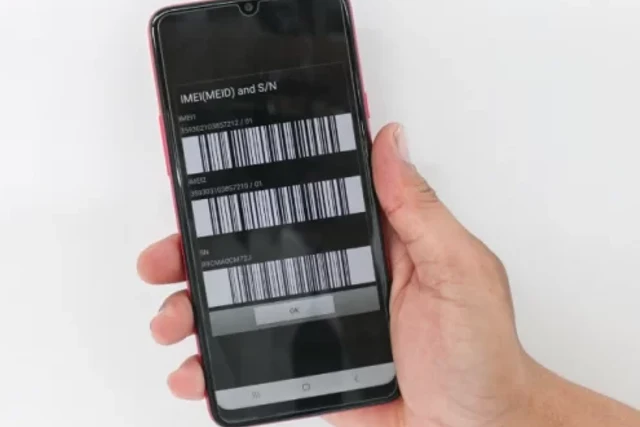
Every mobile phone has a unique 15-digit number as the IMEI (International Mobile Equipment Identity). It is useful for device identification and for tracking stolen or lost phones. You can use the IMEI number of your misplaced handset to track it using the mobile tracking app.
To further appreciate the significance of IMEI number tracking for phone location, check the following important points:
- Every mobile phone has a unique identifier and IMEI number.
- Using mobile tracking software, the IMEI number of a lost or stolen phone can be used to locate the device.
- The phone needs to be turned on and linked to a cellular network to be used for tracking purposes when it is lost or stolen.
- Before the device is lost or stolen, most mobile tracking apps demand the IMEI number to be registered on their platform.
- If the device is misplaced or taken, the user can remotely locate it and retrieve it by logging into the mobile tracking application.
- It is important to remember that the IMEI number cannot be used to track if the device is turned off or disconnected from a network.
IMEI numbers are important for tracing down lost or stolen phones and guarding against unwanted access to private information. IMEI number tracking mobile tracking apps offer a practical and efficient means of finding and recovering a lost device.
How to get an IMEI number on Android
It’s important to know how to locate the IMEI number on your Android device for several purposes, such as unlocking it and blocking it in case it is stolen. The following are the ways to find the Android IMEI number:
Via Settings
- Open “Settings” on your Mobile phone.
- After swiping down, choose “About phone.”
- There is an IMEI number is shown.
Via Dialer
- Open your phone’s dialer app.
- Using the keypad, enter *#06#.
- The IMEI digits of your phone will show up on the screen.
How do I get an IMEI number on iOS?
By inputting a code on the phone app or by going through the device’s settings, you can find the IMEI number. Let’s go over how to locate an iOS device’s IMEI number.
Via Settings
- Open your iPhone’s “Settings” app.
- Click on “General.”
- Click on “About.”
- Scroll down to “IMEI.”
Via Dialer
- Open the phone dialer application.
- Dial *#06# on the keypad.
- The IMEI number of your phone will show up on the screen.
Usually found next to the battery on the back of a mobile phone, the IMEI number is located there. The IMEI number is printed by many phone makers directly on the device.
An alternative is to look at the phone’s packaging box, where a corresponding barcode and a clear label with the IMEI number should be present. Your IMEI number can be used to report a stolen or lost mobile phone to the police, therefore it’s important to keep it safe and secure.
How do I track a phone using IMEI online for free?

If you’ve lost your phone and it’s been stolen, an IMEI tracker can help you find it. While there are several business mobile tracking apps available, you can easily locate your phone using free IMEI tracing online.
Here, we’ll look at how to use a free IMEI tracker to find your phone’s location. Also, please explain how to find it using a phone locating service.
Track the phone using the IMEI website
Tracking a lost or stolen phone using the IMEI website is a solid method of locating it. To monitor the phone using IMEI, perform these steps:
- Get the IMEI number of the phone you want to trace.
- Open the online IMEI tracking website.
- Enter the IMEI number into the necessary field and click the “Track” button.
- The webpage will show the phone’s current location.
Some famous free online IMEI tracker websites include IMEI24 and IMEI Tracker.
Track your phone using the IMEI tracking app
Tracking a lost or stolen phone with an IMEI tracking app is a solid approach to finding it. To monitor the phone using IMEI, perform these steps:
- Install Google Find My Device.
- Open the app and sign in with your Google account.
- Select the device that you want to track.
- You can select multiple options to track your device.
What to do if you are unable to locate your phone using the IMEI?
Losing a phone may be very discouraging, especially if attempts to trace it using an International Mobile Equipment Identity (IMEI) number are useless. Here is How To Register Your DU SIM card, check it also:
Although the IMEI is intended to be a unique identification for mobile phones, it does not always provide reliable tracking of their position. In such cases, there are several alternatives for attempting to locate a lost phone:
Check with local authorities

If you believe your phone was stolen, you should report it to the police. They may be able to find your phone using other means.
Check with your insurance provider
If you have insurance on your phone, they should be able to help you find it or give you a replacement.
Use the phone tracking app
There are many apps available to track the status of your phone. Some popular choices are Find My iPhone, Find My Device (Android), and Prey.
Contact your phone company
Your phone provider may be able to help you in locating your phone. They may have access to additional tools or information that can be used to track your device. To avoid losing your phone in the first place, back up your data regularly, create a secure password, and install a tracking app.

